
Table of Contents
Introduction
Python Calculator Project is one of the most popular beginner programming projects for students who are starting their coding journey. It combines important programming concepts such as variables, user input, functions, classes, conditional statements, and arithmetic operations into a single practical application.
A calculator is something that almost everyone uses daily. Whether calculating expenses, solving mathematics problems, or performing business calculations, calculators play an important role in our lives. Building a calculator using Python helps students understand how software applications work while improving their logical thinking and problem-solving abilities.
The Python Calculator Project is widely used in schools, coding classes, and Grade 8 STEM Activities because it is simple to understand while introducing students to real-world programming concepts. This project also helps learners gain confidence in writing and executing Python programs independently.
What is a Python Calculator Project?
A Python Calculator Project is a software application created using the Python programming language that performs mathematical operations based on user input.
The program allows users to:
- Enter the first number
- Enter the second number
- Select an operation
- Receive the calculated result
The calculator can perform:
- Addition (+)
- Subtraction (-)
- Multiplication (*)
- Division (/)
More advanced versions can also include percentages, square roots, exponents, and scientific calculations.
The purpose of this project is to demonstrate how user input, decision-making, and arithmetic operations work together to create an interactive application.
Why Students Should Learn the Python Calculator Project
The Python Calculator Project is an excellent learning activity because it combines theory with practical implementation.
Benefits of This Project
Improves Logical Thinking
Students learn how to break large problems into smaller manageable tasks.
Develops Programming Skills
The project introduces essential programming concepts in an easy-to-understand way.
Encourages Problem Solving
Students learn how to analyze requirements and create solutions using code.
Builds Confidence
Completing a working calculator gives beginners confidence to explore more advanced projects.
Creates a Strong Foundation
Many advanced software applications use the same concepts learned in this project.
Concepts Used in the Python Calculator Project
The Python Calculator Project uses several important programming concepts.
Variables
Variables store information entered by users.
Examples:
- First number
- Second number
- Operation symbol
Variables make the program dynamic and interactive.
Data Types
Python supports different types of data.
The calculator mainly uses:
- Integer (
int) - String (
str)
Numbers entered by users are converted into integers before calculations.
User Input
The calculator uses the input() function to collect information from users.
Example inputs include:
- Enter first number
- Enter second number
- Enter operation
This allows the program to interact with users in real time.
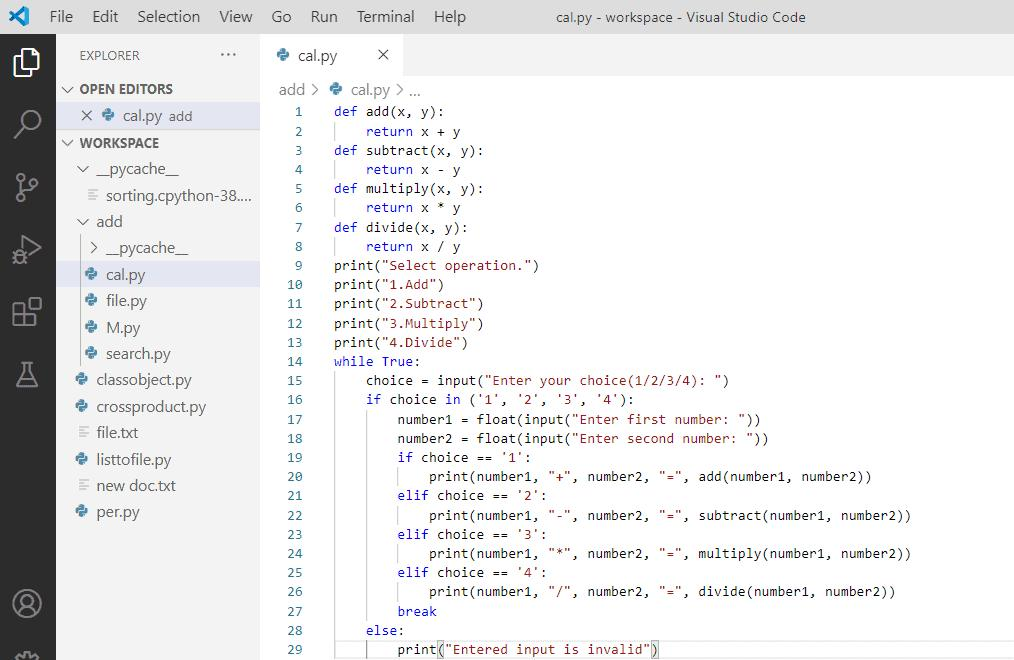
Functions
Functions are reusable blocks of code.
Benefits of functions include:
- Better organization
- Less repetition
- Easier debugging
- Improved readability
Functions help keep the calculator code clean and efficient.
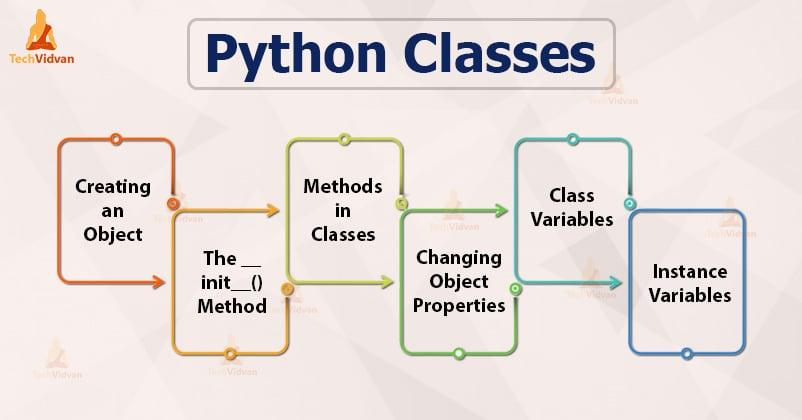
Classes
Classes are used to organize programs into structured components.
Using classes introduces students to Object-Oriented Programming (OOP), which is widely used in software development.
Classes make programs easier to maintain and expand.
Conditional Statements
Conditional statements help programs make decisions.
Examples include:
- If operation is “+”
- Perform addition
- If operation is “-“
- Perform subtraction
- If operation is “*”
- Perform multiplication
- If operation is “/”
- Perform division
Conditional statements are the core decision-making mechanism in the Python Calculator Project.
Tools Required
Creating a Python Calculator Project requires only a few basic tools.
Python
Python is the programming language used to build the calculator.
Students can download Python from the official website.
Visual Studio Code (VS Code)
VS Code is one of the most popular code editors.
Features include:
- Syntax highlighting
- Error detection
- Extension support
- Integrated terminal
It makes coding easier and more efficient.
Understanding the Calculator Workflow
The calculator follows a simple workflow.
Step 1
Display a welcome message.
Step 2
Ask the user to enter the first number.
Step 3
Ask the user to enter the second number.
Step 4
Ask the user to choose an operation.
Step 5
Evaluate the selected operation.
Step 6
Perform the calculation.
Step 7
Display the result.
This workflow demonstrates how software applications process user requests and generate outputs.
Python Calculator Project Structure
The Python Calculator Project generally contains several important sections.
Welcome Message
The program begins with a welcome message.
Example:
print("Welcome to the Python Calculator")
This creates a friendly user experience.
User Input Section
The calculator asks users to enter values.
Example:
num1 = int(input("Enter First Number: "))
num2 = int(input("Enter Second Number: "))
These inputs are stored for future calculations.
Operation Selection
The user chooses the operation to perform.
Examples:
+
-
*
/
The selected operation determines the mathematical calculation.
Result Display
After calculation, the result is displayed on the screen.
Example:
print("Result =", result)
This provides immediate feedback to users.
Functions and Classes in Python
Functions and classes improve code quality and organization.
Why Functions are Important
Functions help:
- Reduce repetition
- Improve readability
- Simplify debugging
- Increase code reusability
For example, separate functions can be created for:
- Addition
- Subtraction
- Multiplication
- Division
Why Classes are Important
Classes group related functions together.
Advantages include:
- Better organization
- Easier maintenance
- Professional coding practices
- Scalability
Many real-world applications use classes extensively.
Conditional Statements and Decision Making
Conditional statements allow the calculator to determine which operation should be performed.
Addition Condition
If the user enters “+”, the calculator performs addition.
Subtraction Condition
If the user enters “-“, the calculator performs subtraction.
Multiplication Condition
If the user enters “*”, the calculator performs multiplication.
Division Condition
If the user enters “/”, the calculator performs division.
Without conditional statements, the calculator would not know which operation the user wants.
Testing the Calculator Program
Testing is an important part of software development.
Test Case 1
Input:
45
47
+
Output:
92
Test Case 2
Input:
5
8
*
Output:
40
Test Case 3
Input:
50
10
-
Output:
40
Test Case 4
Input:
100
5
/
Output:
20
Testing multiple cases ensures the calculator works correctly under different conditions.
Real-World Applications of Calculator Programs
The concepts learned in the Python Calculator Project are used in many industries.
Banking
Calculating loans and interest rates.
Education
Performing mathematical calculations.
Business
Managing profits and expenses.
Engineering
Solving technical calculations.
Data Science
Analyzing numerical data.
Even advanced software systems rely on the same logical principles used in this simple calculator project.
Python Calculator Project in Grade 8 STEM Activities
The Python Calculator Project is one of the most effective Grade 8 STEM Activities because it combines technology and mathematics in a practical way.
STEM stands for:
- Science
- Technology
- Engineering
- Mathematics
Students participating in STEM programs learn:
- Computational thinking
- Problem solving
- Programming logic
- Software development basics
The Python Calculator Project helps students understand how technology can solve everyday problems through coding.
Learning Python with RoboSiddhi
At RoboSiddhi STEM & Robotics, students learn coding through practical and project-based activities.
Projects like the Python Calculator Project help learners:
- Understand coding concepts faster
- Improve creativity
- Build real-world applications
- Develop future-ready technology skills
RoboSiddhi focuses on hands-on STEM learning that encourages innovation, experimentation, and critical thinking among students.
Students gradually progress from simple Python projects to advanced robotics, automation, artificial intelligence, and IoT applications.
Future Scope of Python Programming
Python is one of the fastest-growing programming languages in the world.
It is used in:
- Artificial Intelligence
- Machine Learning
- Robotics
- Data Science
- Automation
- Web Development
- Cybersecurity
- Game Development
Learning the Python Calculator Project is often the first step toward mastering these advanced technologies.
The skills gained from this project create a strong programming foundation for future learning.
Conclusion
The Python Calculator Project is an excellent beginner-level programming project that introduces students to the fundamentals of Python in a practical and engaging way. Through this project, learners gain hands-on experience with variables, user input, functions, classes, and conditional statements while creating a useful application.
As part of Grade 8 STEM Activities, the project helps students develop logical thinking, computational skills, and confidence in coding. It demonstrates how simple programming concepts can be combined to build real-world applications and solve everyday problems.
With guidance from platforms like RoboSiddhi STEM & Robotics, students can use projects like the Python Calculator Project as a stepping stone toward more advanced fields such as robotics, artificial intelligence, automation, and software development. By mastering these fundamentals today, students prepare themselves for the technology-driven careers of tomorrow.