
Learn how to build an ESP32 Bluetooth LED Control Project using Arduino IDE, Bluetooth communication, and a mobile phone. This Grade 9 STEM Activities tutorial teaches IoT, wireless control, and embedded programming.
ESP32 Bluetooth LED Control Project is an exciting beginner-friendly IoT activity that demonstrates how wireless communication can be used to control electronic devices remotely. The ESP32 microcontroller is widely used in modern Internet of Things (IoT) applications because it comes with built-in Bluetooth and Wi-Fi capabilities.
In this project, students will learn how to connect an LED to an ESP32, upload a Bluetooth communication program, and control the LED wirelessly using a smartphone. This hands-on experiment helps learners understand embedded systems, wireless communication, and IoT fundamentals.
The ESP32 Bluetooth LED Control Project is an excellent example of Grade 9 STEM Activities because it combines electronics, coding, and real-world technology into one practical learning experience.
Watch the ESP32 Bluetooth LED Control Project Tutorial
Watch this step-by-step ESP32 Bluetooth LED Control Project tutorial to learn how to connect an LED to ESP32, upload Bluetooth control code, and switch the LED ON and OFF wirelessly using a smartphone.
Table of Contents
What is ESP32?
The ESP32 is a powerful microcontroller designed for IoT and wireless communication projects. Unlike many traditional microcontrollers, ESP32 includes built-in:
- Bluetooth
- Wi-Fi
- Multiple GPIO pins
- Analog and digital interfaces
These features make it ideal for smart home systems, robotics, automation projects, and wireless monitoring applications.
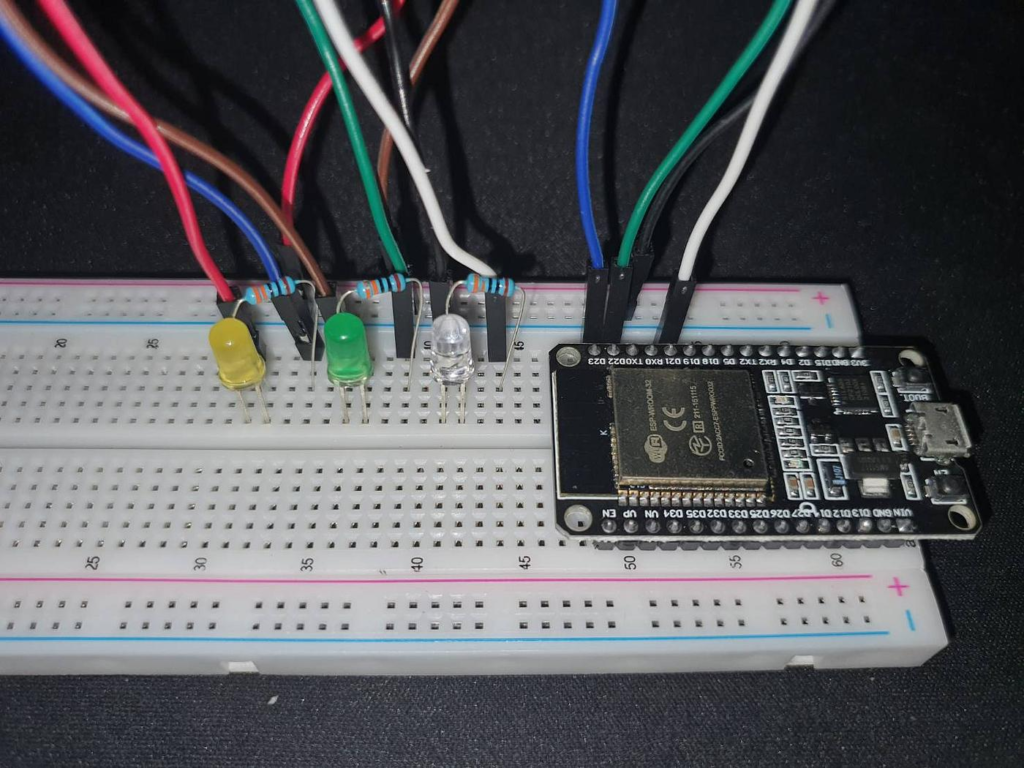
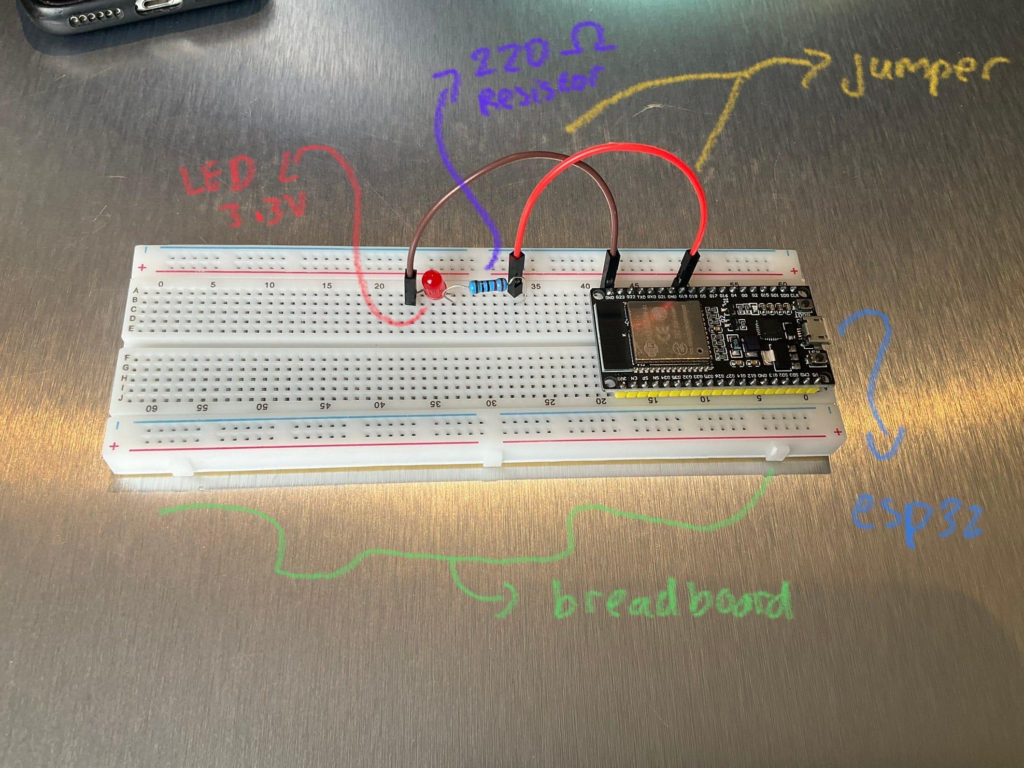
ESP32 microcontroller connected on a breadboard for Bluetooth LED control.
Components Required
To build the ESP32 Bluetooth LED Control Project, you will need:
| Component | Quantity |
|---|---|
| ESP32 Development Board | 1 |
| LED | 1 |
| 220Ω Resistor | 1 |
| Breadboard | 1 |
| Jumper Wires | Several |
| USB Cable | 1 |
| Smartphone with Bluetooth | 1 |
These components are inexpensive and commonly used in beginner IoT projects.
ESP32 Bluetooth LED Circuit Connections
Follow these steps carefully:
Step 1: Place ESP32 on Breadboard
Insert the ESP32 development board securely onto the breadboard.
Step 2: Connect the LED
- Connect the positive leg (anode) of the LED to a GPIO pin through a resistor.
- Connect the negative leg (cathode) to GND.
Step 3: Connect Power
The ESP32 receives power through the USB cable connected to your computer.
Connection Table
| Component | ESP32 Pin |
|---|---|
| LED Positive | GPIO 2 |
| LED Negative | GND |
| USB Cable | USB Port |
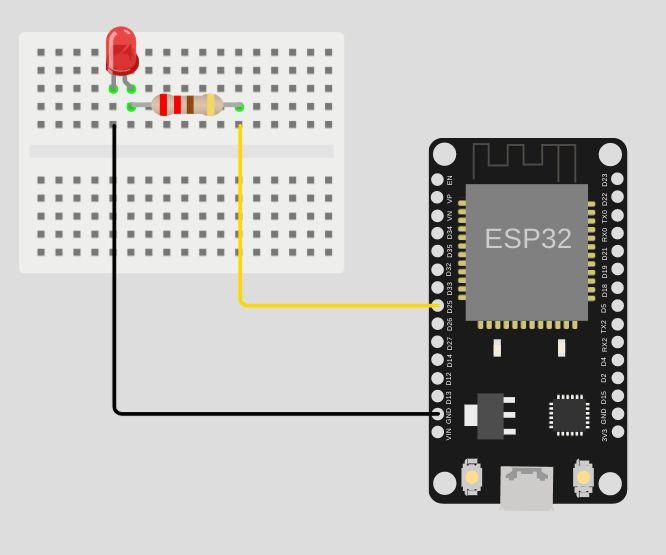
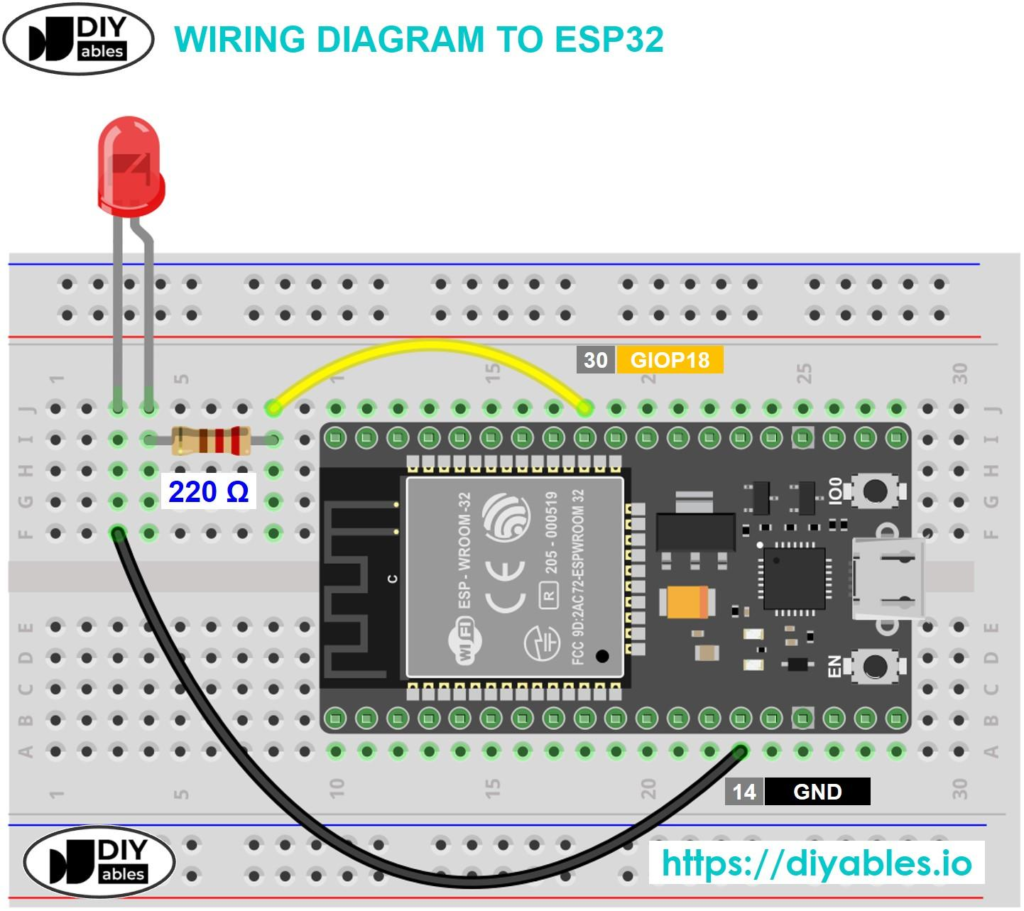
Circuit connections between ESP32, LED, resistor, and breadboard.
Arduino Code
The ESP32 uses Bluetooth Serial communication to receive commands from a smartphone.
Main Functions of the Code
- Initialize Bluetooth communication
- Define LED output pin
- Receive Bluetooth commands
- Turn LED ON or OFF
Sample Logic
if(receivedData == '1')
{
  digitalWrite(LED_PIN, HIGH);
}

if(receivedData == '0')
{
  digitalWrite(LED_PIN, LOW);
}
When the ESP32 receives:
1→ LED turns ON0→ LED turns OFF
Uploading Code to ESP32
Before uploading the program:
Select Correct Board
Go to:
Tools → Board → ESP32 Dev Module
Select COM Port
Choose the correct communication port connected to your ESP32.
Press Boot Button
Some ESP32 boards require pressing the BOOT button while uploading code.
This allows the board to enter flashing mode and accept the program.
Connecting Smartphone via Bluetooth
After uploading the code:
Step 1
Enable Bluetooth on your smartphone.
Step 2
Open a Bluetooth terminal or controller application.
Step 3
Search for the ESP32 Bluetooth device.
Step 4
Connect to the ESP32.
Step 5
Send:
1to turn ON the LED0to turn OFF the LED
Working Principle
The ESP32 Bluetooth LED Control Project works through wireless communication.
Input Stage
The smartphone sends commands through Bluetooth.
Processing Stage
ESP32 receives the data using the Bluetooth Serial library.
Output Stage
Depending on the received command:
- LED turns ON
- LED turns OFF
This simple process demonstrates how modern IoT devices communicate and respond wirelessly.
Output and Results
Once everything is connected:
- LED remains OFF initially.
- Sending
1turns the LED ON. - Sending
0turns the LED OFF. - The process happens instantly through Bluetooth communication.
This confirms successful wireless control using ESP32.
Applications of ESP32 Bluetooth Control
The concepts used in this project can be extended to many real-world applications.
Smart Home Automation
Control lights and appliances wirelessly.
Wireless Robotics
Send movement commands to robots.
IoT Systems
Connect sensors and devices remotely.
Industrial Monitoring
Control equipment from mobile devices.
Educational Projects
Teach embedded systems and wireless communication concepts.
Why Learn STEM Projects with RoboSiddhi?
At RoboSiddhi, students learn technology through practical projects and hands-on experimentation.
The ESP32 Bluetooth LED Control Project helps students understand:
- IoT concepts
- Bluetooth communication
- Embedded programming
- Circuit building
- Automation systems
Our STEM activities encourage creativity, innovation, and problem-solving skills that prepare students for future technology careers.
Frequently Asked Questions
What is ESP32?
ESP32 is a microcontroller with built-in Bluetooth and Wi-Fi used for IoT projects.
Why is Bluetooth used in this project?
Bluetooth allows wireless communication between the ESP32 and a smartphone.
Can I control multiple LEDs?
Yes. Additional GPIO pins can control multiple LEDs or other devices.
Do I need an external Bluetooth module?
No. ESP32 already contains a built-in Bluetooth module.
Is this project suitable for beginners?
Yes. The ESP32 Bluetooth LED Control Project is ideal for beginners and Grade 9 STEM Activities.
Conclusion
The ESP32 Bluetooth LED Control Project is an excellent introduction to IoT and wireless communication. By combining an ESP32 board, an LED, and a smartphone, students can create a simple yet powerful system capable of remote control.
This project teaches important concepts such as Bluetooth communication, embedded programming, and automation. As a Grade 9 STEM Activity, it provides an engaging and practical way to explore the technologies that power modern smart devices.