
Discover Grade 4 STEM activities using a Spider Robot and Ultrasonic Sensor to learn if-else programming, robotics, LEDs, sensors, and beginner coding through fun hands-on STEM education.
Grade 4 STEM Activities: Learning If-Else Logic with a Spider Robot
STEM learning becomes exciting when children can control real robots using simple coding logic. In this engaging Grade 4 STEM Activities project, students learn how to use if-else conditions with an Ultrasonic Sensor and a Spider Robot to create smart robotic behavior.
This beginner-friendly robotics project teaches children:
- If-else programming logic
- Ultrasonic sensor working
- Distance measurement
- LED control
- Robotics automation
- Problem-solving skills
- Basic coding concepts
Students also learn how robots make decisions automatically using sensor data.
What is an If-Else Statement?
An if-else statement is a coding concept that helps robots and computers make decisions.
The robot checks a condition:
- If the condition is true → perform one action
- Else → perform another action
For example:
- If it is raining → use an umbrella
- Else → do not use an umbrella
Similarly, robots use if-else logic to react to their surroundings.
Understanding the Spider Robot
The Spider Robot is a programmable robotics platform designed for STEM education and beginner robotics learning.
The robot includes:
- Multiple moving legs
- Embedded microcontroller board
- LED lights
- Sensor support
- Block-based programming compatibility
The robot can:
- Move forward
- Move backward
- Turn left or right
- Detect obstacles
- React automatically using sensors
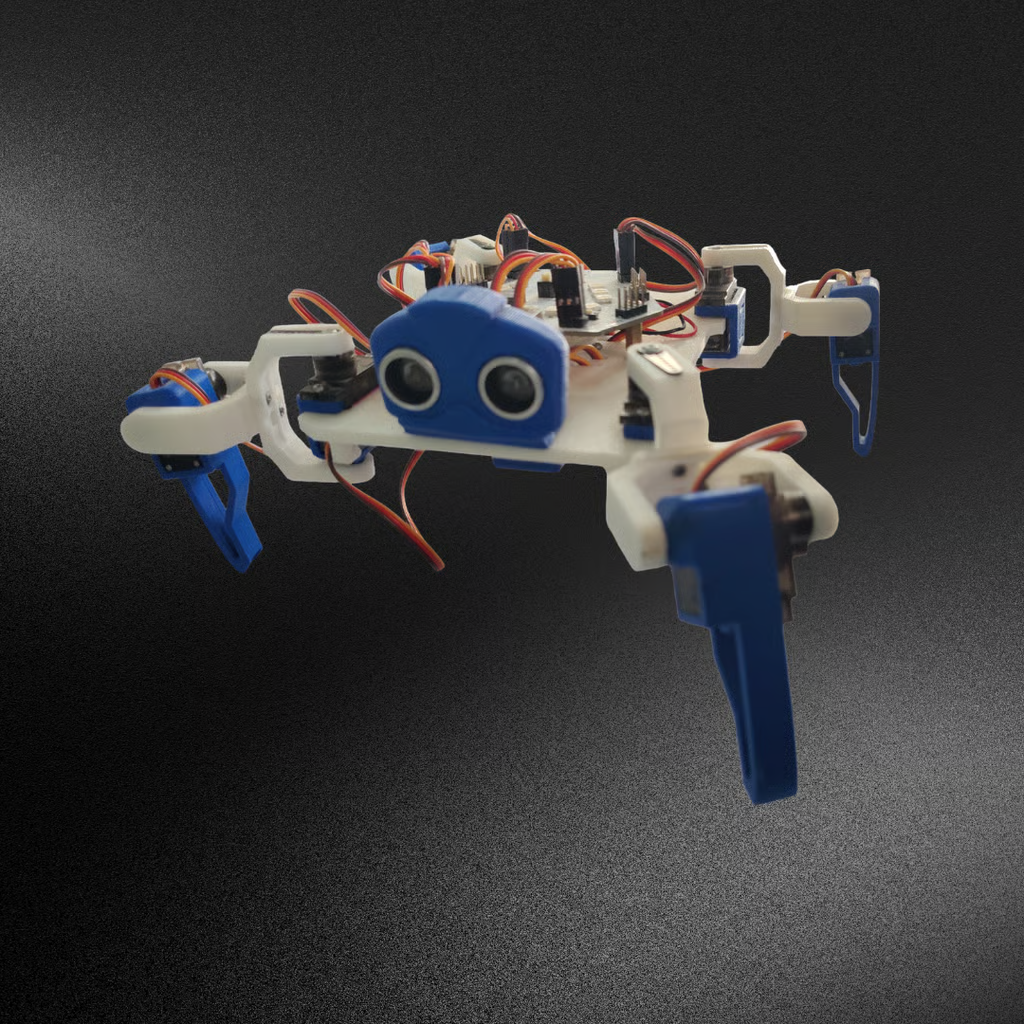

What is an Ultrasonic Sensor?
An Ultrasonic Sensor measures distance using sound waves.
It works by:
- Sending ultrasonic sound waves
- Detecting reflected waves
- Calculating the distance of nearby objects
The sensor helps robots avoid obstacles and move safely.
Ultrasonic sensors are commonly used in:
- Obstacle avoidance robots
- Self-driving cars
- Parking sensors
- Smart robotics systems
- Automation projects
Components Required for the Project
| Component | Purpose |
|---|---|
| Spider Robot | Main robotics platform |
| Ultrasonic Sensor | Detects nearby objects |
| Microcontroller Board | Controls robot behavior |
| USB Cable | Connects robot to computer |
| LEDs | Visual indicators |
| Computer | Used for coding and programming |
Connecting the Ultrasonic Sensor
Correct wiring is important for accurate sensor readings.
Sensor Connections
| Ultrasonic Sensor Pin | Connection |
|---|---|
| Trigger Pin | Pin 2 |
| Echo Pin | Pin 1 |
| VCC | 5V |
| GND | Ground |
The ultrasonic sensor continuously measures the distance between the robot and nearby objects.


Understanding If-Else Logic in Robotics
The robot uses sensor values to decide what action to perform.
Basic Robot Logic
- If an object is closer than 10 cm → turn LEDs ON
- Else → turn LEDs OFF
This helps the robot respond intelligently to nearby obstacles.
The condition can be written as:
d < 10
When the condition becomes true, the robot reacts automatically.
How the Robot Detects Obstacles
The ultrasonic sensor continuously checks distance values.
Object Detected
When distance is less than 10 cm:
- LEDs turn ON
- Robot detects obstacle
- Alert behavior activates
No Object Detected
When distance is greater than or equal to 10 cm:
- LEDs remain OFF
- Robot continues normal operation
This creates a smart obstacle detection system.
Programming the Spider Robot
The robot is programmed using a beginner-friendly block coding interface.
Setup Section
The setup block:
- Initializes sensor pins
- Starts communication
- Runs only once
Loop Section
The loop block:
- Continuously reads sensor values
- Repeats robot actions
- Checks if-else conditions repeatedly
This allows real-time robotic responses.
Why Less-Than Conditions Work Better
The tutorial explains an important programming concept.
Using:
d = 10
is not practical because sensor readings constantly change.
Instead, using:
d < 10
gives better and more reliable obstacle detection.
This teaches children how real robots make flexible decisions using sensor ranges.
Real-Life Applications of If-Else Logic
If-else conditions are used in many technologies around us.
Smart Cars
Cars detect nearby obstacles and apply brakes automatically.
Automatic Lights
Lights turn ON when motion is detected.
Security Systems
Sensors trigger alarms when intruders are detected.
Robotics
Robots react to environmental changes automatically.
STEM Learning Benefits for Students
This Grade 4 STEM activity helps students:
- Learn coding basics
- Understand robotics systems
- Improve logical thinking
- Explore sensor technology
- Develop problem-solving skills
- Build creativity through robotics
Hands-on learning makes science and technology easier to understand.
RoboSiddhi – Supporting STEM and Robotics Education
RoboSiddhi provides robotics kits, sensors, STEM learning tools, coding boards, and educational electronics products for students and schools.
Students can explore:
- Robot kits
- Flame sensors
- Coding boards
- STEM learning materials
- DIY robotics projects
- Electronics components
RoboSiddhi helps children learn robotics through creative hands-on STEM education.
Grade 4 STEM Activities: Safety Instructions
While working with robotics projects:
- Handle wires carefully
- Keep electronics away from water
- Use adult supervision
- Avoid loose electrical connections
Safety is important during all STEM activities.
Final Thoughts
This Grade 4 STEM Activities Spider Robot Project introduces children to robotics, sensors, and if-else programming in a simple and exciting way.
By combining an ultrasonic sensor with coding logic, students learn how robots detect obstacles and react automatically using intelligent decision-making systems.
Projects like these encourage creativity, innovation, and curiosity while building strong foundations in STEM education and robotics.